


NetSuite–Jira Integration
Connect Jira with NetSuite so service requests, implementation work, escalations, and project tasks move with the right customer, project, and financial context. Fixed-scope NetSuite–Jira integration for support, delivery, PMO, and systems teams.
Start Integration
Organizations around the world trust us


When NetSuite–Jira Integration Matters
A NetSuite–Jira integration becomes a priority when support, delivery, or internal operations run daily execution in Jira while customer records, cases, project structure, or downstream reporting live in NetSuite. Teams keep shipping work. Visibility breaks across the handoffs.
A request lands with a summary, priority, and assignee. The team still needs customer details, contract context, project linkage, or entity information from NetSuite before the work can move cleanly.
Jira manages the workflow, status transitions, queueing, and team execution. NetSuite holds the project structure, customer record, case history, or project task. Teams end up maintaining both by hand.
Support, account teams, operations, and finance need progress and closure status. Jira has the live signal. NetSuite often holds the record used elsewhere in the business. Updates travel through messages and manual check-ins.
Jira workflows are flexible. NetSuite cases and project tasks follow their own structure. A ticket can look complete in Jira while the downstream case, task, or reporting field still needs the right closure, resolution, or handoff status.
Priority, SLA pressure, queue assignment, and service rules can be strong inside Jira. The broader business still needs clean visibility into the impact, owner, and customer history inside NetSuite.
Engineering sees queue volume, workflow stage, and throughput in Jira. Operations or leadership checks NetSuite for project and customer context. Teams spend time explaining the gaps between both views.
Run service and delivery workflows with Jira in motion and NetSuite in sync
Sphere connects Jira to NetSuite so issues, service requests, tasks, and project-related work carry the right business context from start to finish. Our team maps statuses, priority logic, customer and project lookups, and closure rules so Jira remains the execution layer and NetSuite stays aligned for visibility, governance, and downstream reporting.
Stop stitching systems manually — integrate NetSuite with clarity and ownership.
What Sphere builds between NetSuite and Jira
Issue-to-case sync
Sphere maps Jira issues and service requests into NetSuite issues or cases with the right customer, ownership, and lifecycle logic.
Task-to-project-task sync
Jira tasks can create or update NetSuite project tasks so delivery teams keep working in Jira while project structure remains usable in ERP.
Customer and project context
Jira users, projects, or linked work can be matched to NetSuite customers, project records, or custom records so teams stop searching for the business context behind the ticket.
Workflow and status mapping
Statuses, resolutions, priorities, categories, and queue logic are mapped intentionally so dashboards, closure states, and downstream reports stay coherent.
Escalation and exception handling
Failures, missing lookups, invalid transitions, and duplicate-creation risks route into a managed error flow with clear ownership.
How NetSuite and Jira stay aligned
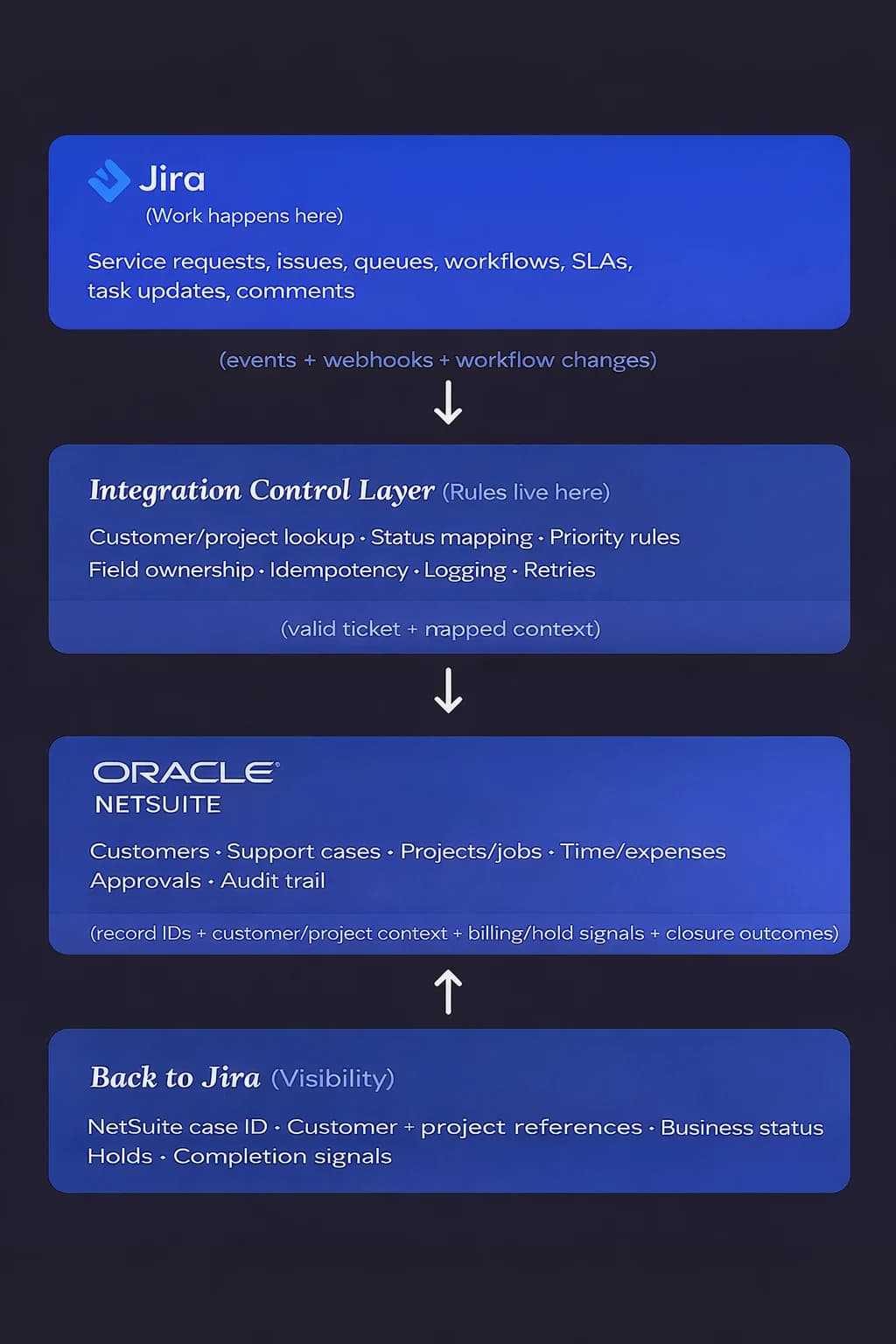
Sphere builds Jira–NetSuite integrations as a governed control layer rather than a direct tool-to-tool sync. Jira remains the place where service teams and operations manage requests, issues, workflows, and SLAs. NetSuite remains the system of record for customers, cases, projects, and financial context. Between them we implement a structured integration layer that resolves customer and project references, translates workflow status, enforces field ownership, and ensures updates are processed once through idempotency and validation rules.
This approach prevents duplicate cases, broken mappings, and inconsistent status reporting. Jira users gain visibility into ERP identifiers, customer context, and business outcomes, while NetSuite receives clean, auditable records tied to the correct entity and project structure. The result is a stable integration that supports operational workflows in Jira while protecting the integrity of NetSuite reporting and audit trails.
How this integration is delivered

Phase 1 — Integration Assessment
2–3 weeks. Fixed price. Defines scope, flows, and complexity tier.

Phase 2 — Implementation
Fixed-price range based on complexity. Accelerator-based delivery.

Phase 3 — Managed Integration
Monthly support, optimization, and new workflows.
You buy the integration. The assessment defines how it will be built and priced.
Start IntegrationCustomer Stories
Explore Out MoreHear from
our clientsHear from our clients

Lee Ebreo
VP of Engineering at Credit Ninja
These things would not have been achievable if we did not build our own in-house system and if we did not partner with Sphere to help us achieve our goals.

Selah Ben-Haim
VP of Engineering at Prominence Advisors
Our experience with Sphere and their team has been and continues to be fantastic. We keep throwing new projects at them, and they keep knocking them out of the park (including the rescue of a project that was previously bungled by another vendor).

Ben Crawford
Senior Product Manager at Enova Financial
I would expect to be delighted. It's been a really positive experience, working with Sphere, and I would expect you to have the same.

Mark Friedgan
CEO at CreditNinja
Sphere consistently prioritizes the needs of their clients, demonstrating both agility and teamwork. As an offshore team, they have been an integral part of our organization and we plan to continue growing with them.

René Pfitzner
Co-Founder at Experify
Sphere provided excellent full-stack development manpower to augment our team and help push our product forward. They are easy to work with, tech-savvy and proactive.

Bruce Burdick
Chief Information Officer at Integra Credit
We've been working with Sphere and its excellent consultants since our founding. I've found that they are true partners in the success of our business.

Jemal Swoboda
CEO at Dabble
The resources and developers that Sphere Software provides are skilled and have the required technical expertise, but more importantly, they have helped us build a culture of excellence within our team.

Arthur Tretyak
Founder and CEO at IntegraCredit
With Sphere, we were able to migrate in half the time it would take to train an additional FTE… and for a fraction of the cost. Our experience with Sphere has been exceptional.
Lee Ebreo
VP of Engineering at Credit Ninja
These things would not have been achievable if we did not build our own in-house system and if we did not partner with Sphere to help us achieve our goals.
Selah Ben-Haim
VP of Engineering at Prominence Advisors
Our experience with Sphere and their team has been and continues to be fantastic. We keep throwing new projects at them, and they keep knocking them out of the park (including the rescue of a project that was previously bungled by another vendor).

TOP AI CODE GENERATION COMPANY UNITED STATES 2025

TOP AI TEXT GENERATION COMPANY FLORIDA 2025

TOP APP DEVELOPMENT COMPANY MANUFACTURING 2025

TOP ARTIFICIAL INTELLIGENCE COMPANY UNITED STATES 2025

TOP CHATBOT COMPANY UNITED STATES 2025

TOP RECOMMENDATION SYSTEMS COMPANY UNITED STATES 2025

GLOBAL RECOGNITION AWARDS 2026

BEST IN AI FOR DOCUMENTATION VALIDATION 2026

BEST IN AI POWERED INVOICE AUDITING 2026

GLOBAL TECH WINNER 2026

GLOBAL GENERATIVE AI AWARD 2026 WINNER
Sphere in Numbers
We understand that actions speak louder than words and numbers but here are some key facts about us.
Get the Right Talent now0
Years of Excellence
0+
Projects Delivered
0
Countries
Globally diverse, community-focused
0+
Clients
top 20 average 8+ years
Clear scope. Predictable cost. No open-ended builds.
Please provide your contact details, and our team will get back to you promptly.